
Creating Panels in Bootstrap
The following example shows that how to create beautiful panels using Bootstrap.
[wp_ad_camp_1]
- Simply copy and paste the following code in notepad and save it as xyz.html (any file name but .html extension) and view in browser.
<!DOCTYPE html>
 <html lang="en">
 <head>
 <title>Bootstrap Examples</title>
 <meta charset="utf-8">
 <meta name="viewport" content="width=device-width,
 initial-scale=1">
 <link rel="stylesheet"
 href="https://maxcdn.bootstrapcdn.com/bootstrap/3.3.7/cs
 s/bootstrap.min.css">
 <script
 src="https://ajax.googleapis.com/ajax/libs/jquery/3.1.1/jque
 ry.min.js"></script>
 <script
 src="https://maxcdn.bootstrapcdn.com/bootstrap/3.3.7/js/b
 ootstrap.min.js"></script>

<table class="table table-striped table-hover ">
 <tr class="primary">

<td align="center"><div class="panel panel-primary">
 <div class="panel-heading">
 <h3 class="panel-title">Technical</h3>
 </div>
 <div class="panel-body">
 <img src="world128.png"><br>
 <button type="button" class="btn btn-primary">Go to
 blog</button>
 </div>
 </div></td>
 <td align="center"><div class="panel panel-warning">
 <div class="panel-heading">
 <h3 class="panel-title">Non-Technical</h3>
 </div>
 <div class="panel-body">
 <img src="people.png"> <br>
 <button type="button" class="btn btn-warning">Go to
 blog</button>

</div>
 </div></td>
 <td align="center"><div class="panel panel-success">
 <div class="panel-heading">
 <h3 class="panel-title">Trending topics</h3>
 </div>
 <div class="panel-body">
 <img src="vault128.png"><br>
 <button type="button" class="btn btn-success">Go to
 blog</button>

</div>
 </div></td>
 </tr>
 </table>
 </body>
 </html>
[wp_ad_camp_2]
Output of the above code is…
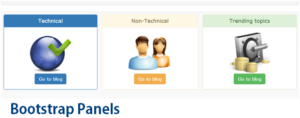
Click here for Bootstrap on offline mode