
Excel has built-in functions called VLookup [Verticals Lookup] and HLookup [Horizontal Lookup]
These two functions are now most widely used formula for finding absolute and reference values from sheet.
[wp_ad_camp_1]
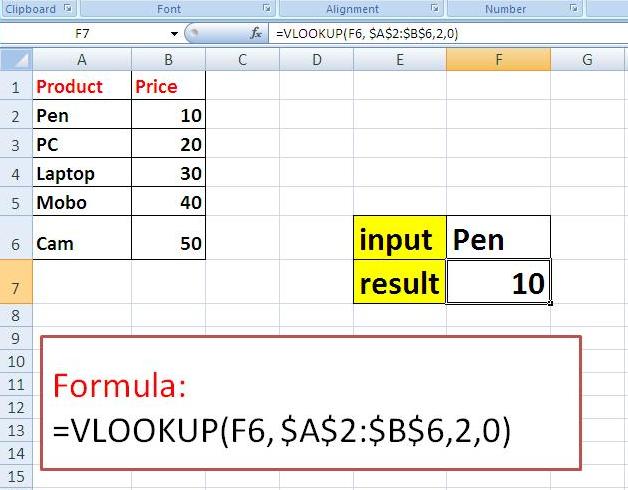
VLOOKUP is a Vertical Lookup for searching values from first column.
VLookUp : Please create following excel sheet with data in it and write the formula / function as : =VLOOKUP(F6, $A$2:$B$6,2,0)
[wp_ad_camp_2]
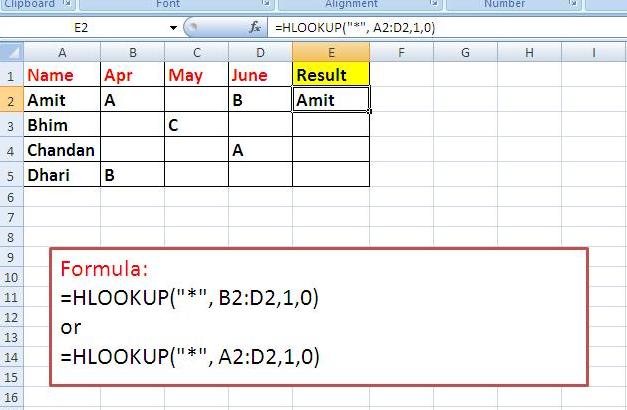
HLOOKUP is a Horizontal Lookup for searching values from each row.
HLookUp : Please create following excel sheet with data in it and write the formula / function as : =HLOOKUP(“*”, B2:D2,1,0)
You can also check for other important excel example here